-
![Sven Joos’s Avatar]() Sven Joos
★★★★★
9 months ago
Ich nutze seit Jahren TAPICall und bin damit sehr zufrieden. Wenn es mal Probleme gibt, bekomme ich jederzeit schnelle und einfache Unterstützung vom Anbieter.
-
![Christian Howaldt’s Avatar]() Christian Howaldt
★★★★★
10 months ago
Convergit with IP Softphone delivers first-class software that is indispensable for us here.
The service is first-class, competent, committed, friendly, and understanding. It simply couldn't be better. Therefore, 6 stars, unfortunately, one can only award 5 stars.
Many thanks to the Convergit team and thank you for doing such a great job for us.
I can only strongly recommend using the IP Softphone program against today's background of liability.
-
![Reiner Kowarik’s Avatar]() Reiner Kowarik
★★★★★
a year ago
Als Benutzer des Programmes TAPICALL kann ich nur meiner großen Zufriedenheit UAsdruck verleihen. Das Programm läuft einwandfrei uns hat mir schon in den vergangen en Jahren beste Dienste erwiesen. Das "Zusammenspiel " mit meiner Fritzbox funktioniert immer bestens. TApicall ist aus meiner Sicht wirklich zu empfehlen
-
![Otto Engels’s Avatar]() Otto Engels
★★★★★
a year ago
Langjähriger, kleiner Kunde. Umstellung auf Glasfaseranschluß. Neue FritzBox, neues Telefon. Übernahme von TAPICall.
Telefon wieder von Convertit GmbH, TAPICall natürlich auch, und wieder einmal die tolle, "knackige", effektive Unterstützung per Fernbetreuung durch die Geschäftsführung bei der Einrichtung!!!
Hoch lebe der servicestarke Mittelstand!!!
-
![Maria Nickel’s Avatar]() Maria Nickel
★★★★★
a year ago
Kann ich mit ruhigem Gewissen weiterempfehlen. Termin wurde sehr schnell vergeben. Die anstehenden Arbeiten des Telefonanschlusses Verbindung mit Glasfaser und viele Fachfragen wurde vorzüglich und schnell erledigt. Dankeschön. Alles top
-
![Ina Falkner’s Avatar]() Ina Falkner
★★★★★
a year ago
Das IP-SoftPhone ist für Freiberuflicher:innen wie mich die ideale Telefonie-Lösung. TAPI-Schnittstelle, mehrere SIP Clients möglich und Herr Roesler hatte eine Engelsgeduld mit mir. Selten so einen guten Service erlebt. 100 Prozent Weiterempfehlung!
-
![Matthias Maier’s Avatar]() Matthias Maier
★★★★★
a year ago
Topp Service und super IT- gerade die Tapi- Schnittstellen aus dem Hause convergit sind Gold Wert und funktionieren, hier mussten wir lange suchen bis wir diesen Anbieter gefunden haben. Kann ich nur weiter empfehlen, einmal eingerichtet, funktioniert tadellos.
-
![Michael Thöle’s Avatar]() Michael Thöle
★★★★★
a year ago
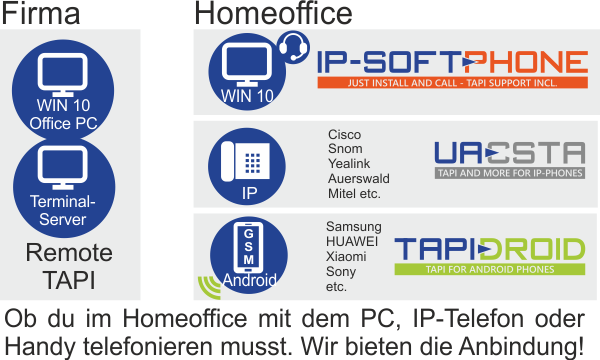
Thank you for the professional and quick support. We had to set up two client computers with a terminal server with SIP phones and needed a TAPI interface for the software. Solution: uaCSTA.
Despite the demo mode, help was always provided immediately to solve the problem. The offer of a Teams session is also very reasonably priced. An SAP data pusher wouldn't even be able to finish a hot coffee here.
Really recommendable and always happy to go back.
-
![Birgit Riedl’s Avatar]() Birgit Riedl
★★★★★
a year ago
Absolute recommendation. For years I was annoyed because I couldn't get my software provider's telephone assistant to work. Thanks to Convergit, it now runs like clockwork. Thank you very much
-
![GemS Plön’s Avatar]() GemS Plön
★★★★★
a year ago
Great support over the phone and drivers were provided for me to download..., great!
-
![Dieter Seban’s Avatar]() Dieter Seban
★★★★★
a year ago
Top software with excellent support.
Thank you for the quick and competent support
-
![Sabin Bergmann’s Avatar]() Sabin Bergmann
★★★★★
a year ago
TapiCall is brilliant. When I receive incoming calls, I immediately have all the information about my customers that I have entered in Outlook contacts. Plus, reliable support. Thank you, dear Mr. Roesler, for this great software and for your always quick support when questions arise.
-
![Metzler Freiburghaus’s Avatar]() Metzler Freiburghaus
★★★★★
a year ago
Wow, thanks for the support!
So competent and all the information in a first email, combined with your homepage which has all the instructions available!
Big compliment!
-
![Friderike Löser’s Avatar]() Friderike Löser
★★★★★
a year ago
Great help with problems with internal TAPICALL usage, even with a non-company program! Very friendly and helpful, just what you'd expect from a hotline!
-
![Xaver Strähuber’s Avatar]() Xaver Strauber
★★★★★
a year ago
TAPICall in use since 2007.
Very competent hotline, which fortunately is rarely needed
-
![Stefan Heck’s Avatar]() Stefan Heck
★★★★★
a year ago
Very competent and reliable. Thank you for the great service
-
![Konrad Studer’s Avatar]() Konrad Studer
★★★★★
2 years ago
Very competent support when setting up TAPICall
-
![Andreas Graf’s Avatar]() Andreas Graf
★★★★★
3 years ago
I've been a customer for years and am very, very satisfied with the support! I just called :, and within a second I was connected to a knowledgeable consultant who was able to help me immediately!
-
![Stefan Koch’s Avatar]() Stefan Koch
★★★★★
3 years ago
In February 2024, I installed IP softPhone for our insurance brokerage office. All employees are enthusiastic without exception. When a customer whose phone number is stored in our system calls, the customer's name is displayed. If we now click on "Display," the customer's contracts are displayed. This has become an essential component for us in the course of digitalization. We recommend the product and the excellent service from IP softPhone.
-
![Wigand Schäfer’s Avatar]() Wigand Schäfer
★★★★★
3 years ago
I have rarely had such good, competent and targeted support on the phone. Mr. Daniel Roesler clearly stands out from his competitors. I can therefore not only give the software, but also the support and the owner 5 stars.
-
![Armin Ender’s Avatar]() Armin Ender
★★★★★
3 years ago
I have been a customer for several years now and am very satisfied. Every time I had problems I was able to call at short notice and support helped me immediately.
-
![Mark Höhfeld’s Avatar]() Mark Höhfeld
★★★★★
3 years ago
Tapi Call is perfect for my purposes. (frequent caller with old Tapi- telephone and MS365.
-
![Gerry Uhr’s Avatar]() Gerry watch
★★★★★
3 years ago
No waiting time on the hotline. High commitment, even though the error was sitting in front of the computer. And even after several attempts, still friendly, trying to solve the problem. Thank you for your struggle for a solution, I almost gave up. Thanks and have a good time. G. Watch
-
![Ulf Gloede’s Avatar]() Ulf Gloede
★★★★★
3 years ago
Received very competent help purely as a courtesy, although I am not a customer and am not entitled to any support.
Thank you very much!
-
![Ulrich-Michael Dismer’s Avatar]() Ulrich-Michael Dismer
★★★★★
3 years ago
The online support is characterized by a high degree of competence and speed.
It's worth bearing the costs incurred, you can't solve it yourself that quickly.
-
![Torsten Marzenell’s Avatar]() Torsten Marzenell
★★★★★
3 years ago
CONVERGIT GmbH offers first-class service and individually tailored solutions. The team is professional, competent and exceeded my expectations. The cooperation was pleasant, the communication was excellent. Thank you very much!
-
![Stefan Meyer’s Avatar]() Stephen Meyer
★★★★★
3 years ago
Simply class! Support takes care of problems immediately, software works perfectly - We are completely satisfied!
100% to recommend 🙂
-
![Christoph Siegel’s Avatar]() Christopher Seal
★★★★★
4 years ago
Very competent • Top software brings real time savings • No more calls are lost • Very good advice on our new telephone purchase • I can only recommend. • I've been using the Tapicall software for well over 15 years and no failures or crashes, i.e. software that works in practice. • full recommendation
-
![Patrick Ludes’s Avatar]() Patrick Ludes
★★★★★
4 years ago
Great shop! They installed and commissioned my wdsl antenna very professionally and easily. Here, you are still valued as a customer and receive truly individualized service. I'd be happy to come back anytime!
-
![Patrick Ludes (Dicker Tanzbär)’s Avatar]() Patrick Ludes (Fat Dancing Bear)
★★★★★
4 years ago
Great shop! They installed and commissioned my wdsl antenna very professionally and easily. Here, you are still valued as a customer and receive truly individualized service. I'd be happy to come back anytime!
-
![P. L. (Dicker Tanzbär)’s Avatar]() P. L. (Fat Dancing Bear)
★★★★★
4 years ago
Great shop! They installed and commissioned my wdsl antenna very professionally and easily. Here, you are still valued as a customer and receive truly individualized service. I'd be happy to come back anytime!
 CONVERGIT GmbH